Unsure how much power your gaming PC really needs Navigating the world of power supply units PSUs can be daunting especially when balancing a demanding job family and a passion for gaming As a modern gamer you want optimal performance without overspending or creating unnecessary hassle This comprehensive guide dives into the essential factors determining your gaming PCs power requirements from understanding component wattage to planning for future upgrades Discover how to select the perfect PSU for your current build ensuring stable reliable performance for those precious gaming hours and prepare for tomorrow's AAA titles without breaking the bank We'll cover everything from CPUs and GPUs to peripherals and cooling solutions providing practical advice for busy adults who value efficient setups and smart investments Learn to identify common power pitfalls calculate your systems total wattage needs and choose a PSU that offers both stability and a little headroom for the future whether you're building a new rig or upgrading an existing one This resource is crafted to help you make informed decisions ensuring your gaming sessions are powered smoothly and efficiently allowing you to relax unwind and enjoy your favorite games without a hitch It's about smart gaming for smart people.
Q: How do I calculate the wattage for my gaming PC?
A: The most accurate way to calculate your gaming PC's wattage is by using a dedicated online PSU calculator. Websites like PCPartPicker, OuterVision Power Supply Calculator, or Cooler Master's PSU Calculator allow you to input your specific CPU, GPU, RAM, storage drives, and other components. These tools provide a reliable estimate of your system's peak power draw, often suggesting a recommended PSU size with a buffer.
Q: What size PSU do I need for a high-end gaming PC?
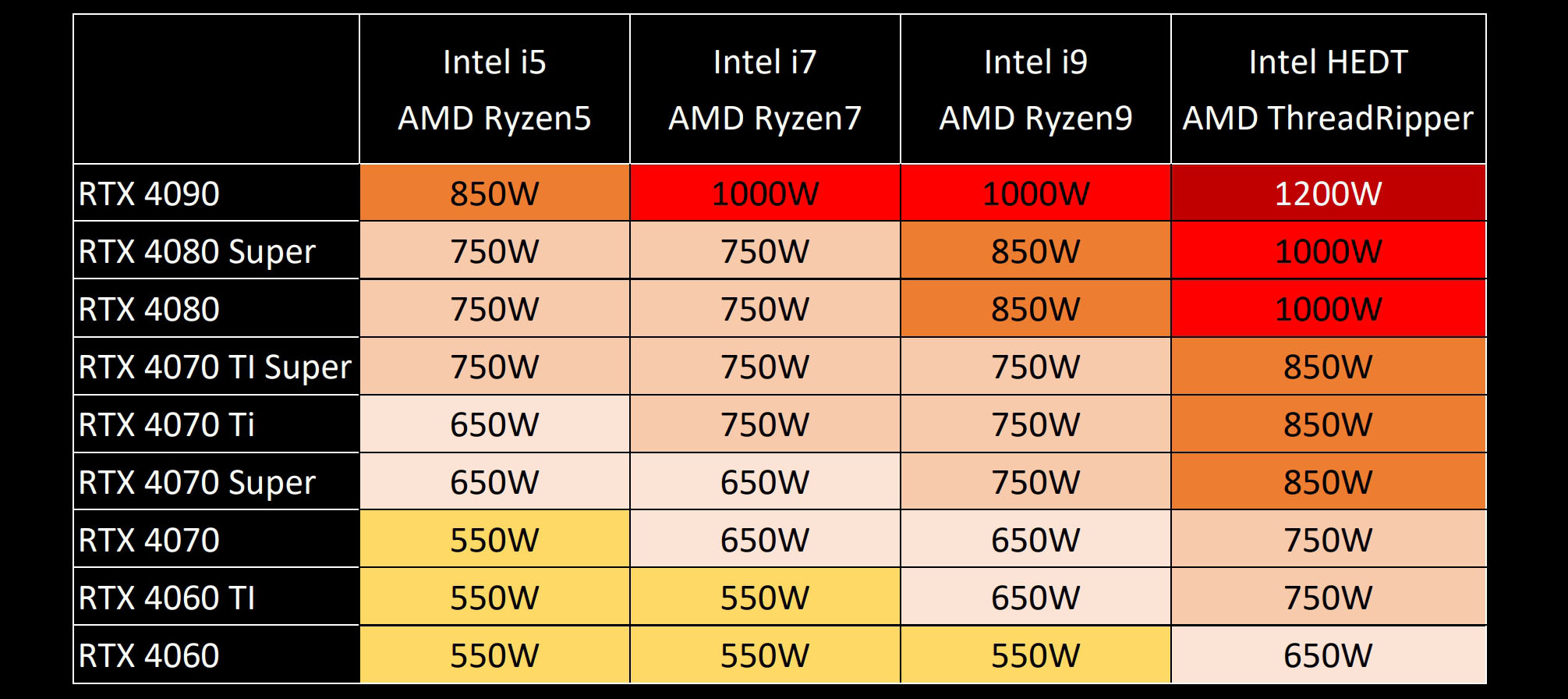
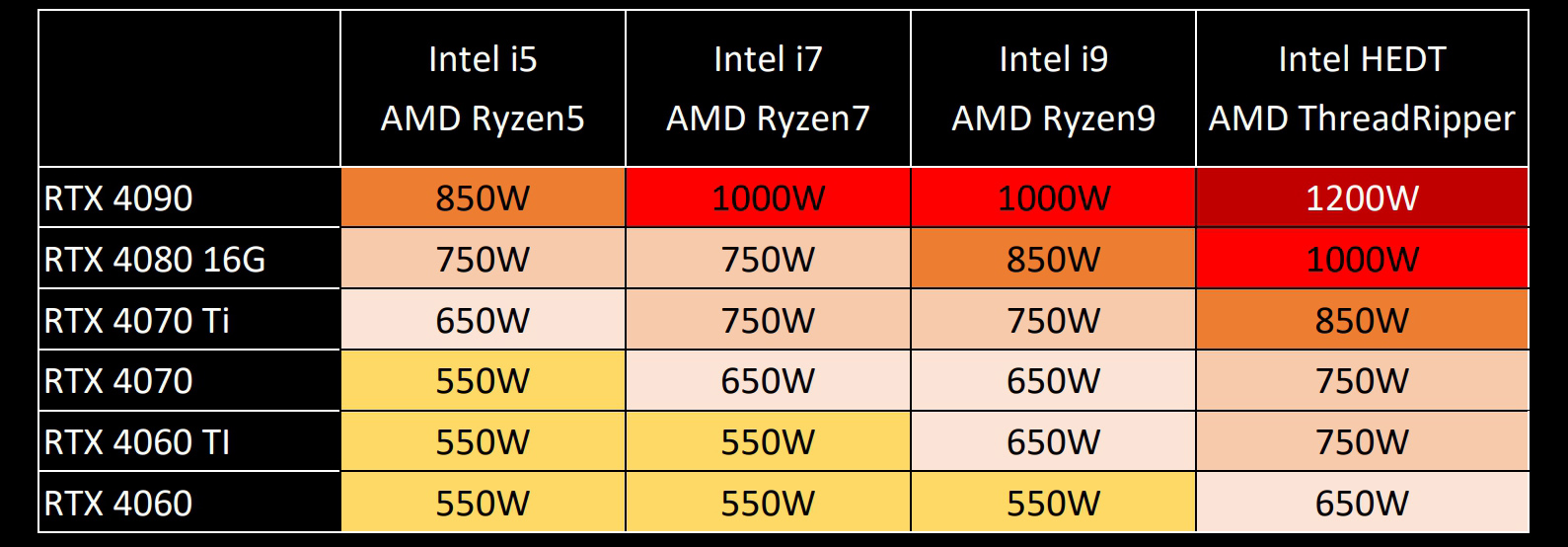
A: For a high-end gaming PC featuring a top-tier CPU and a flagship GPU (like an NVIDIA RTX 4080/4090 or AMD RX 7900 XTX), you'll typically need a PSU in the 850W to 1000W range. This wattage ensures stable power delivery during intense gaming sessions, accommodates power spikes from modern GPUs, and provides sufficient headroom for future upgrades and overclocking. Always check specific component recommendations.
Q: Is a 750W PSU enough for gaming?
A: A 750W PSU is an excellent choice and often enough for many mid-to-high-end gaming PCs. It can comfortably power most modern setups featuring a powerful CPU (e.g., Ryzen 7, Core i7) and a single high-performance GPU (e.g., RTX 4070, RX 7800 XT). For very top-tier GPUs or if you plan extensive overclocking, a slightly higher wattage might be beneficial, but 750W offers a great balance of power and efficiency for the majority of gamers.
Q: What happens if my PSU is too low wattage?
A: If your PSU is too low wattage, your gaming PC will likely experience instability, such as sudden shutdowns, reboots, or freezes during gameplay. You might also encounter performance throttling, where your GPU or CPU can't reach its full potential due to insufficient power, leading to lower frame rates and stuttering. In severe cases, it could potentially shorten the lifespan of your components or the PSU itself due to constant overload.
Q: How important is PSU efficiency (80 PLUS rating)?
A: PSU efficiency, indicated by 80 PLUS ratings (Bronze, Gold, Platinum, Titanium), is very important. A higher efficiency rating means less power is wasted as heat, resulting in lower electricity bills, less heat generated within your PC case, and potentially quieter operation. For busy gamers, this translates to long-term savings, a cooler system, and better reliability, contributing to a more enjoyable and stress-free gaming experience.
Q: Why do gaming PCs need more power than regular PCs?
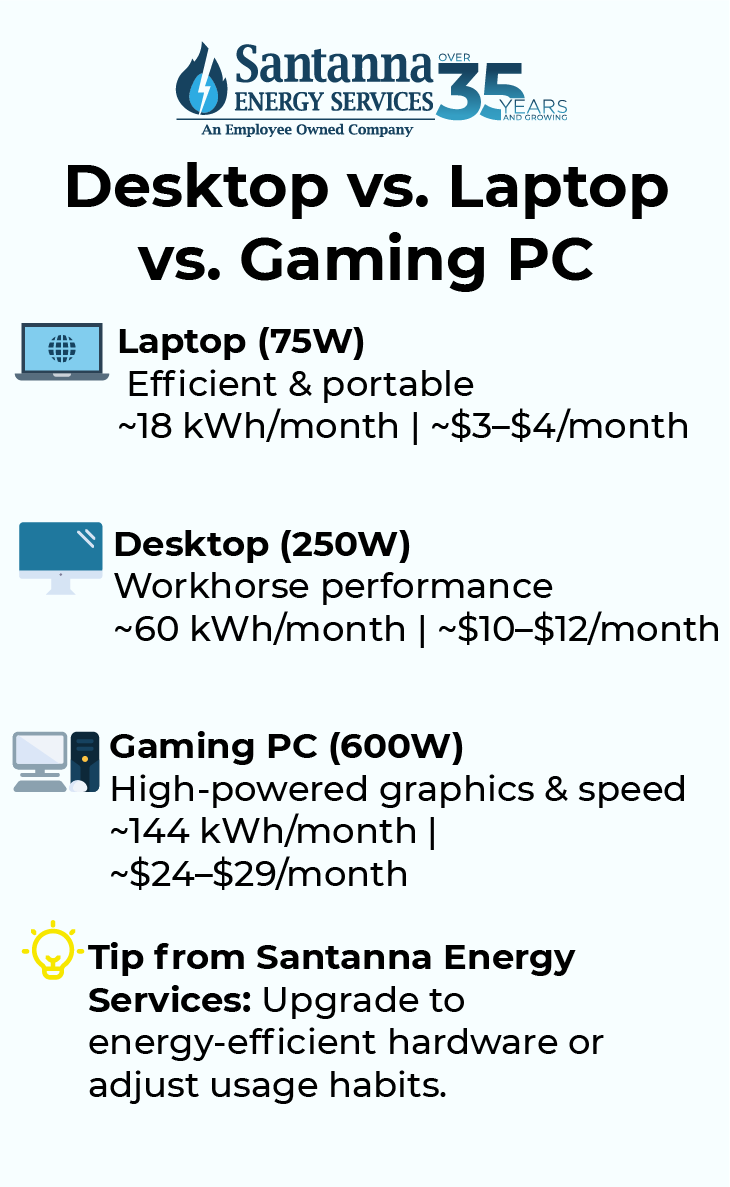
A: Gaming PCs require significantly more power than standard desktop PCs primarily due to their high-performance graphics cards (GPUs) and CPUs. These components are designed to handle demanding tasks like rendering complex 3D environments and processing intricate game logic, which requires substantial electrical power, especially during peak gaming loads. Regular PCs often lack a dedicated high-end GPU or powerful CPU.
Q: Does a modular PSU affect power delivery?
A: No, a modular PSU does not directly affect the quality or amount of power delivered to your components. Its primary benefit is cable management: you only plug in the cables your system needs, reducing clutter and improving airflow inside your case. Electrically, a modular, semi-modular, or non-modular PSU of the same wattage and efficiency rating will perform identically in terms of power delivery.
Q: How can I check my current PC's power consumption?
A: You can check your current PC's power consumption using a few methods. Software tools like HWMonitor or HWiNFO can provide estimates of component power draw (especially GPU). For a precise measurement of total system draw from the wall, you can use a hardware watt meter (kill-a-watt meter) plugged into your wall socket, then your PC into the meter. This gives real-time, accurate consumption data.
Q: Is a used or refurbished PSU safe for my gaming rig?
A: Generally, buying a used or refurbished PSU is not recommended for a gaming rig, especially if you're investing in expensive components. PSUs degrade over time, and a used unit might have reduced efficiency, unstable voltage delivery, or be prone to sudden failure, potentially damaging other hardware. It's safer to invest in a new, reliable PSU from a reputable brand with a good warranty to protect your system.
Q: What's the difference between wattage and amperage in a PSU?
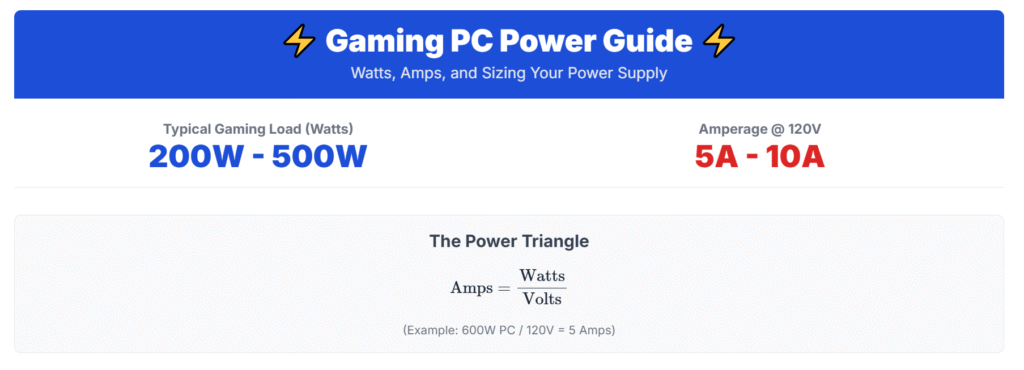
A: Wattage (W) is the total power delivered (Voltage x Amperage). Amperage (A) is the strength of the electrical current. PSUs have multiple "rails" (e.g., +12V, +5V, +3.3V), each with a maximum amperage. For gaming PCs, the +12V rail is most critical as it powers the CPU and GPU. Modern PSUs often have a single, strong +12V rail, and its combined amperage capability is a key factor in determining how much wattage it can supply to power-hungry components.
Q: Do I need a special PSU for overclocking my CPU or GPU?
A: While you don't necessarily need a "special" PSU, you should definitely factor in additional wattage if you plan to overclock your CPU or GPU. Overclocking significantly increases power draw, pushing components beyond their stock specifications. Aim for an extra 100-150W buffer on top of your calculated peak wattage to ensure stable power delivery and reliability during overclocked operation. A higher efficiency rating (Gold or Platinum) is also recommended.
Q: How often should I clean my PSU fan?
A: You should aim to clean your PSU fan every 6-12 months, or more frequently if your environment is particularly dusty. Dust buildup on the fan and internal components can reduce cooling efficiency, leading to higher operating temperatures and potential component failure. Use compressed air to carefully blow out dust from the fan and vents, ensuring the fan blades don't spin rapidly during cleaning.
Hey fellow gamers! Ever found yourself staring at a bewildering array of power supply units, wondering "how much power does my gaming pc need" to keep those pixels flowing smoothly? You’re not alone. Many of us, balancing demanding jobs, family life, and that precious time to unwind with our favorite titles, know the struggle of wanting top-tier performance without the headache of hardware woes or an inflated electricity bill. With about 87% of US gamers regularly diving into virtual worlds, often for 10+ hours a week, ensuring your rig is perfectly powered is key to relaxation, skill-building, and staying connected with friends online. This guide is crafted for you, the smart gamer who values efficiency, value for money, and a stable, lag-free experience above all else.
Choosing the right power supply unit, or PSU, isn't just about plugging things in. It's about ensuring every component, from your beastly GPU to your speedy SSDs, gets the consistent, clean energy it needs to perform its best. An underpowered or inefficient PSU can lead to frustrating game crashes, unexpected shutdowns, and even damage to your valuable hardware. Overdoing it might just mean you spent more than you needed to, or worse, your PSU operates at a less efficient point. We'll cut through the jargon and provide you with practical, actionable advice so you can confidently pick the perfect power heart for your gaming machine, allowing you to focus on dominating your next match or exploring new worlds. Let’s power up your knowledge!
How Much Power Does My Gaming PC Really Need?
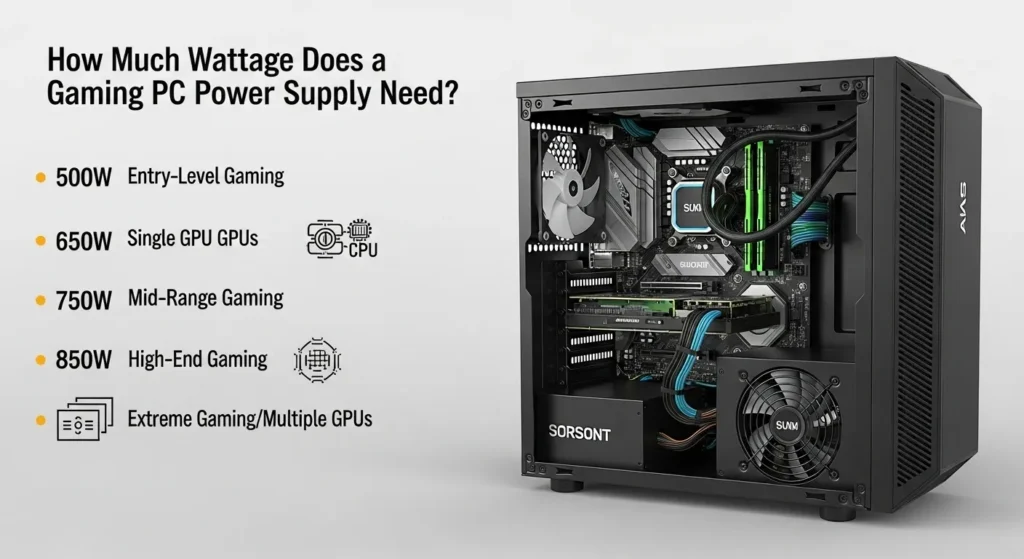
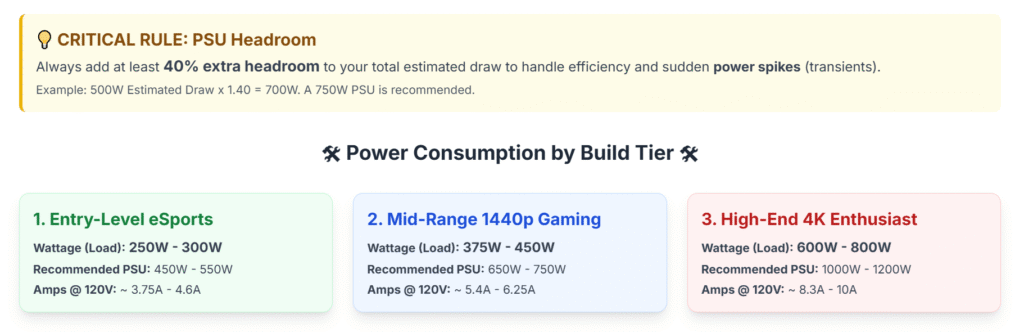
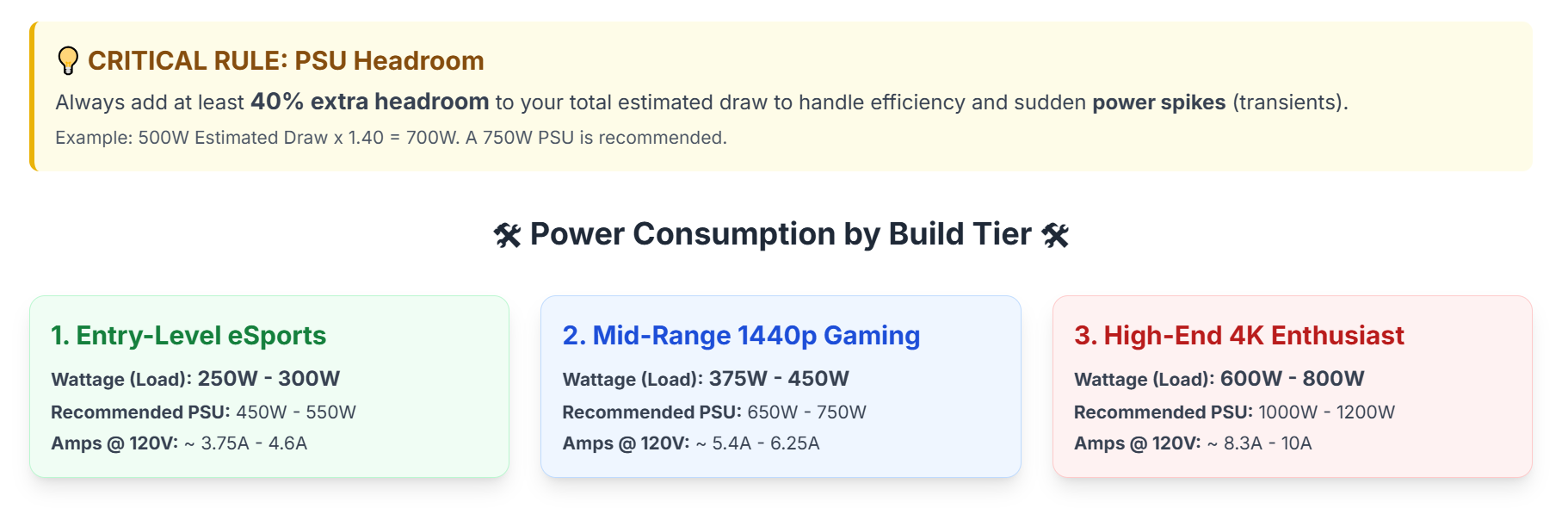
Determining the exact power your gaming PC needs isn't a one-size-fits-all answer. It largely depends on your specific components, especially your CPU and GPU, which are the biggest power hungry parts. Generally, a modern mid-range gaming PC with a solid graphics card might need anywhere from 500W to 650W. High-end rigs, especially those running powerful processors and top-tier GPUs, often demand 750W to 850W or even more. The key is to calculate your total system wattage and then add a buffer for stability and future upgrades.
Think of it like this: your PC components are athletes, and the PSU is their meal. You want to give them enough fuel to perform at their peak without overfeeding them to the point of sluggishness. Gamers are always looking for that performance edge, whether it's for competitive esports, immersive VR experiences, or simply enjoying the latest AAA titles on maximum settings. Understanding your power requirements ensures your system can handle those intense moments without a hitch, keeping you in the game longer.
What Are the Key Components That Consume Power in My PC?
Every part of your gaming PC draws power, but some are far thirstier than others. Knowing these helps prioritize your PSU choice.
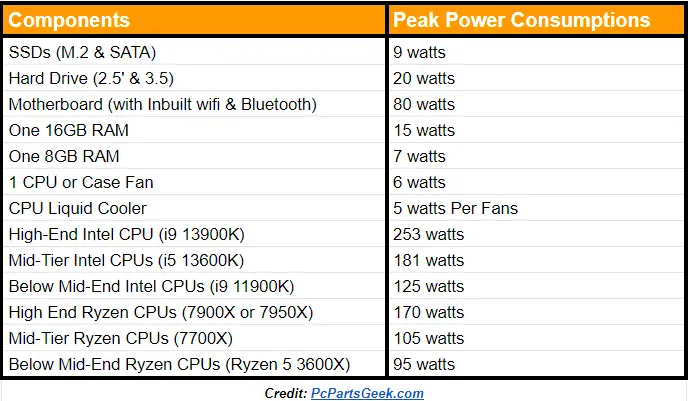
- Graphics Card (GPU): This is almost always the biggest power consumer, especially high-performance models from NVIDIA or AMD. Modern GPUs can easily draw 200-450W on their own during peak gaming.
- Central Processing Unit (CPU): The brain of your PC. While not as power-hungry as the GPU, high-performance CPUs (like Intel's i7/i9 or AMD's Ryzen 7/9) can still consume 65-200W, particularly when overclocked or under heavy load from complex games or streaming.
- Motherboard: It powers various integrated components and manages power distribution. It typically draws 25-50W.
- RAM (Random Access Memory): Your memory sticks are surprisingly efficient, usually consuming only about 2-5W per stick. Even with 32GB or 64GB, the total is minimal.
- Storage Drives (SSDs/HDDs): Solid State Drives (SSDs) are very efficient, using around 2-10W. Hard Disk Drives (HDDs) use slightly more, around 5-15W when active.
- Cooling Fans & RGB Lighting: These add up, especially in builds with multiple case fans, CPU coolers, and extensive RGB strips. Each fan might draw 1-3W, and RGB can add another 5-15W depending on complexity.
- Peripherals (via USB): While powered by the motherboard, external devices like keyboards, mice, webcams, and external drives draw power from the PSU indirectly. This is usually negligible for basic setups but can add up with multiple high-power USB devices.
How Do I Calculate My Gaming PC's Total Wattage Requirement?
Calculating your PC's wattage is crucial. While you could manually add up component TDPs (Thermal Design Power) and maximum power draw figures, a dedicated online PSU calculator is your best friend. These tools ask for your exact CPU, GPU, number of RAM sticks, storage drives, and other accessories, then provide a recommended wattage. They account for peak usage and provide a buffer. Websites like PCPartPicker, OuterVision Power Supply Calculator, or Cooler Master's PSU Calculator are excellent resources.
When using a calculator, always input your *exact* components. If you're planning an upgrade, input the future components to get an accurate foresight. After you get the estimated wattage, it's generally a good practice to add a 10-20% buffer. So, if a calculator suggests 550W, aiming for a 650W or 750W PSU gives you stability and breathing room for future needs without stressing the unit to its max capacity. This smart approach helps busy gamers avoid performance issues and ensures their investment lasts.
Why Is PSU Efficiency Important for Gamers?
PSU efficiency refers to how much power drawn from the wall socket is actually converted and delivered to your PC components, versus how much is lost as heat. This is where the "80 PLUS" ratings come in: Bronze, Silver, Gold, Platinum, and Titanium. Higher ratings mean better efficiency.
For example, an 80 PLUS Gold certified PSU is at least 87% efficient at 20% load, 90% at 50% load, and 87% at 100% load. This means if your PC needs 500W, an 80 PLUS Gold PSU drawing 90% efficiency at that load would pull approximately 555W from the wall. A less efficient unit might pull 625W for the same 500W output.
Why does this matter for you, the gamer?
- Lower Electricity Bills: Over time, higher efficiency means less wasted power, translating to tangible savings on your utility bill. Every watt counts, especially when gaming for hours.
- Less Heat: Wasted power turns into heat. A more efficient PSU generates less heat, which means your PC components and case fans don't have to work as hard to cool everything down, potentially leading to a quieter system.
- Better Reliability and Longevity: Less heat stress generally means the PSU itself, and potentially other nearby components, will last longer. This is a big win for value-for-money, allowing you to stretch your hardware budget further.
While an 80 PLUS Bronze or Silver is perfectly adequate for many builds, aiming for Gold or Platinum often provides the best balance of cost and long-term benefits for the average US gamer.
What Happens If My Gaming PC's Power Supply Is Too Weak?
Using a PSU that's too weak for your gaming PC can lead to a host of frustrating and potentially damaging issues. These are common pain points for gamers trying to squeeze performance out of an inadequate setup:
- System Instability and Crashes: The most common symptom. Your PC might randomly shut down, reboot, or freeze during intense gaming sessions when components demand peak power. This interrupts your flow, especially in competitive or social games.
- Performance Throttling: Components, especially your GPU, might not receive enough power to reach their full potential. This can lead to lower frame rates (FPS) and stuttering, even if your CPU and GPU are theoretically capable of more.
- Component Damage: While modern PSUs often have protection circuits, a consistently overloaded unit can lead to premature wear and tear on the PSU itself and potentially stress other components with unstable power delivery.
- "Black Screen" Issues: Your monitor might go black during gameplay, forcing a hard reset. This often indicates the GPU briefly lost stable power.
- Unusual Noises: An overloaded PSU might make whining or buzzing noises as it struggles to meet demand.
In essence, an underpowered PSU will degrade your gaming experience and risk your hardware. It's a fundamental part of your PC's health that shouldn't be skimped on.
Can a Power Supply Be Too Strong for My Gaming PC?
While an underpowered PSU is problematic, having a power supply that's "too strong" isn't necessarily bad, within reason. It just means you have more wattage capacity than your components require. There are a few considerations:
- Cost: Higher wattage PSUs are generally more expensive. If you buy a 1200W unit for a system that only needs 600W, you've likely overspent without gaining proportional benefit.
- Efficiency Curve: PSUs are most efficient at around 50-60% of their rated load. If your 1200W PSU is only ever running at 20% load (240W), it might be less efficient than a 750W PSU running at 40% load (300W). This impacts your electricity bill and heat generation. However, the difference is often minimal for Gold-rated or higher units.
- Physical Size: Very high wattage PSUs (e.g., 1000W+) can sometimes be physically larger, making installation tricky in smaller PC cases.
The sweet spot is usually selecting a PSU with 10-20% more wattage than your calculated peak system demand. This provides stability, optimal efficiency, and enough headroom for minor upgrades down the line. Don't be afraid of a little extra wattage, but avoid extreme overkill.
How Do I Choose a Future-Proof Power Supply for Upgrades?
Future-proofing your PSU is a smart move for any gamer who plans to keep their rig updated without constantly replacing core components. Here’s how to approach it:
- Add Headroom: As mentioned, select a PSU with 15-25% more wattage than your *current* calculated peak needs. This allows for upgrading your GPU or CPU to a slightly more powerful model in 2-3 years without needing a new PSU. For example, if your current build needs 600W, a 750W or 850W PSU would be a good future-proof choice.
- Consider GPU Trends: Graphics cards are the biggest power hogs, and their power demands generally increase with each generation. Research rumored power draws for upcoming GPU series from NVIDIA and AMD to anticipate future requirements.
- Modularity: Opt for a fully modular or semi-modular PSU. This means you only connect the cables you need, reducing clutter and improving airflow inside your case. While not directly about power, good cable management makes future upgrades and maintenance much easier.
- Efficiency Rating: Aim for at least 80 PLUS Gold. This ensures that even as components evolve, your PSU remains efficient, saving you money and running cooler in the long run.
- Reputable Brands: Stick with trusted manufacturers known for quality and reliability (e.g., Seasonic, Corsair, EVGA, be quiet!, Cooler Master, SilverStone, Thermaltake). A reliable PSU is less likely to fail and will protect your valuable components.
By taking these steps, you can avoid the frustration of realizing your PSU can't handle your new, shiny GPU a year or two down the line, saving you both time and money.
Are There Specific Power Needs for Modern Gaming Trends like VR or Streaming?
Absolutely! Modern gaming isn't just about playing titles; it's also about immersive experiences and sharing those experiences. These trends significantly impact your power requirements:
- Virtual Reality (VR): VR headsets demand high, consistent frame rates, pushing both your GPU and CPU to their limits. This means your system will be drawing near-peak power for extended periods. If you're into VR, consider an extra 50-100W buffer in your PSU selection to ensure stability and prevent performance dips during intense VR sessions.
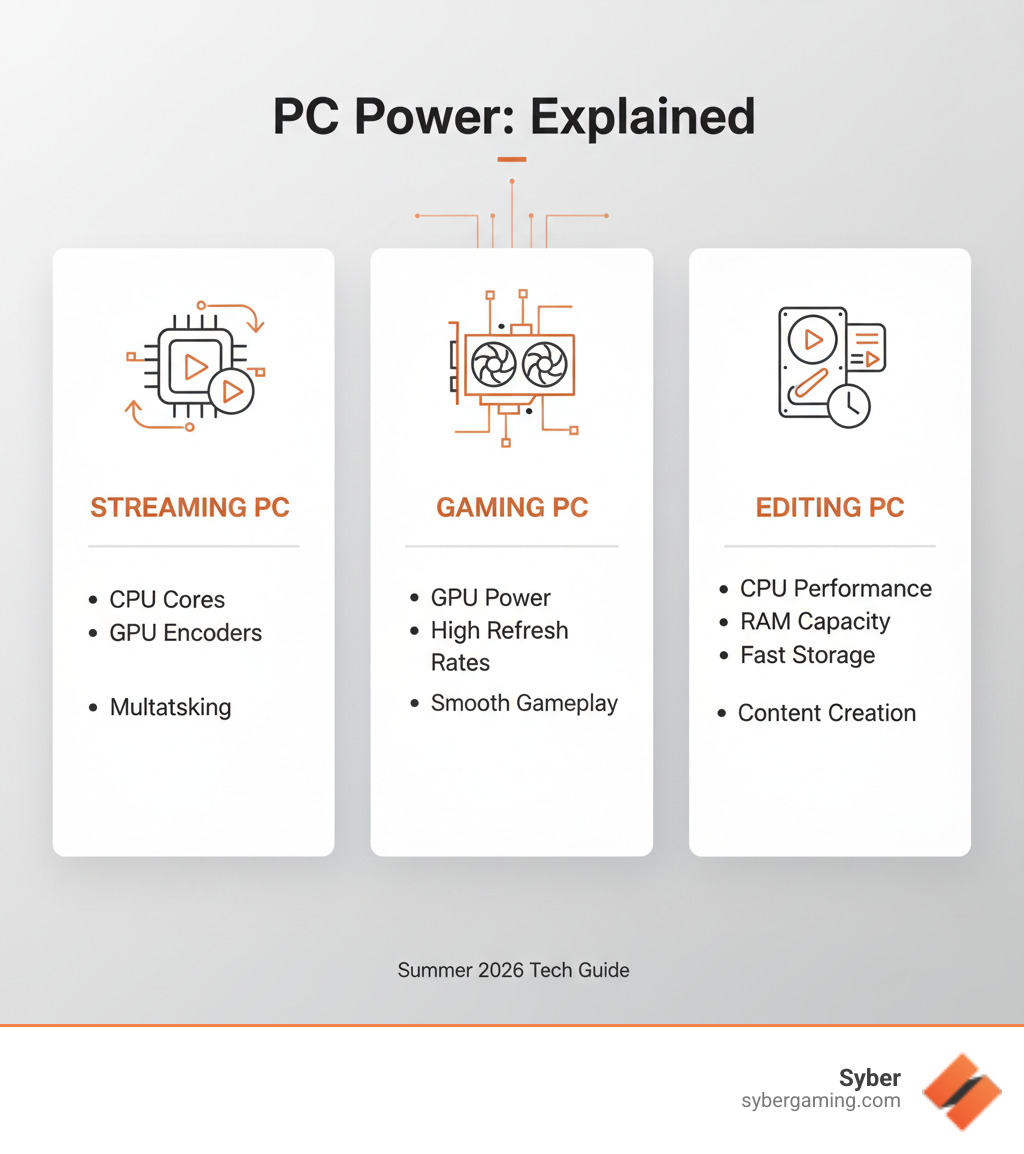
- Streaming and Content Creation: Running a game, streaming software (like OBS or Streamlabs), a webcam, and other peripherals simultaneously puts a considerable load on your CPU and GPU. Many streamers also use capture cards or multiple monitors. This multi-tasking scenario significantly increases your baseline power draw. Aim for the higher end of the recommended wattage for your components, perhaps an additional 100-150W beyond a pure gaming setup, especially if you plan to stream with high bitrates or complex overlays.
- Multi-Monitor Setups: While not as demanding as VR or streaming, running multiple high-resolution monitors (especially high refresh rate gaming monitors) does slightly increase GPU power consumption.
US gamers, especially Gen Z and Millennials, are increasingly engaging with social gaming and content creation, often balancing gaming with work and family. Ensuring your rig can handle these multifaceted demands without breaking a sweat is key to maintaining that stress-relief and social connection.
Where Can I Find Reliable Power Supply Calculators?
To accurately gauge "how much power does my gaming pc need," using a reliable online power supply calculator is essential. These tools take the guesswork out of the equation. Here are some of the most trusted ones:
- PCPartPicker: This site is a fantastic resource for planning entire PC builds. As you add components, it automatically calculates estimated wattage, helping you choose a compatible PSU. It's great for seeing real-time compatibility and power draw as you pick parts.
- OuterVision Power Supply Calculator: One of the most detailed calculators available. It lets you input a wide array of components, including CPU, GPU, RAM, storage, cooling, and even USB devices, giving you a highly precise wattage estimate. They offer both a simple and an expert mode.
- Cooler Master PSU Calculator: Another popular and straightforward tool that guides you through selecting your components and provides a recommended PSU wattage.
- Manufacturer-Specific Calculators: Some PSU manufacturers like Seasonic or EVGA offer their own calculators. These can be helpful if you're already leaning towards a specific brand.
Always double-check your inputs for accuracy, especially for your CPU and GPU models, as slight variations can impact power draw. These tools are regularly updated with new component data, ensuring you get the most current recommendations for your specific build.
What Are the Best Practices for PSU Installation and Cable Management?
Once you've chosen the perfect PSU, proper installation and cable management are key to a clean, cool, and efficient build. This can prevent common issues like poor airflow and struggling to add new components later.
- Mounting: Most PSUs are mounted at the bottom of the case. Ensure the fan faces the correct way (usually downwards if your case has a filtered bottom intake, or upwards if it's a solid bottom and the PSU pulls air from inside the case). Refer to your case and PSU manuals.
- Secure Connections: Double-check that all cables are firmly seated. Loose connections can lead to instability or component failure. The main 24-pin motherboard power, 8-pin (or 4+4-pin) CPU power, and PCIe power cables for your GPU are critical.
- Cable Management:
- Route behind the Motherboard Tray: Most modern cases have space behind the motherboard tray for routing cables. Use this to keep the main compartment clear.
- Use Cable Ties/Velcro Straps: Bundle cables neatly. This not only looks better but also significantly improves airflow, helping keep your components cooler, which is crucial for those extended gaming sessions.
- Modular PSUs are Your Friend: If you have a modular or semi-modular PSU, only plug in the cables you absolutely need. This drastically reduces clutter.
- Don't Over-Bend Cables: While you want them neat, avoid kinking or excessively bending cables, especially thicker ones like the 24-pin.
- Power Outlet: Plug your PC into a surge protector, not directly into the wall, to protect against power fluctuations.
A tidy build isn't just for aesthetics; it genuinely contributes to better performance and longevity for your gaming PC. It’s a small effort that pays big dividends, making maintenance easier and ensuring a smooth gaming experience.
Conclusion
Navigating the power demands of your gaming PC doesn't have to be a daunting task. By understanding your components, using reliable calculators, prioritizing efficiency, and accounting for future upgrades and gaming trends, you can confidently answer "how much power does my gaming pc need" for your unique setup. A well-chosen PSU ensures stable performance, protects your valuable hardware, and even helps save a few bucks on your electricity bill – all vital for the modern gamer balancing life and leisure. Remember, a happy PC makes for a happy gamer. So, empower your rig, enjoy uninterrupted gameplay, and keep those epic moments rolling.
What's your biggest gaming challenge when it comes to hardware? Comment below! We love hearing from fellow enthusiasts!
Frequently Asked Questions About Gaming PC Power
Q: Does an SSD require much power?
A: No, Solid State Drives (SSDs) are very power efficient, typically drawing only 2-10 watts during operation. They are significantly more efficient than traditional Hard Disk Drives (HDDs), making them a low-power choice for storage in gaming PCs.
Q: What is PSU headroom and why is it important?
A: PSU headroom refers to the extra wattage capacity your power supply has beyond your PC's peak power draw. It's crucial because it ensures stable power delivery during sudden spikes, allows for future component upgrades, and lets the PSU operate at a more efficient, cooler, and quieter level, extending its lifespan.
Q: Can a noisy PSU be a sign it's too weak?
A: Yes, a noisy PSU, particularly one making whining, buzzing, or unusually loud fan noises during gaming, can often indicate it's struggling to provide enough power and is being overloaded. This stress can lead to instability and shortened lifespan.
Q: Should I worry about my power outlet's capacity?
A: In most modern homes in the US, standard 15-amp outlets provide plenty of power (up to 1800W) for a single gaming PC, even a high-end one. However, avoid plugging multiple power-hungry devices (like another PC, a space heater, or an air conditioner) into the same outlet or circuit to prevent tripping breakers.
Q: How often should I consider upgrading my PSU?
A: A high-quality PSU can last 5-10 years. You generally only need to upgrade your PSU if you're making a significant hardware jump (e.g., from a mid-range GPU to a flagship, or adding a second GPU) that pushes your system's total wattage beyond your current PSU's capacity, or if your current unit shows signs of failure.
Q: Is an ATX 3.0 PSU necessary for new builds?
A: While not strictly "necessary" yet for all builds, ATX 3.0 PSUs are designed for the increasing power demands and transient spikes of modern GPUs (especially NVIDIA's 40-series and AMD's RX 7000-series). They feature a 12VHPWR connector. If building a new high-end rig or planning for future GPU upgrades, an ATX 3.0 PSU is highly recommended for optimal compatibility and stability.
Q: Does PSU brand matter?
A: Absolutely. PSU brand matters significantly for reliability, efficiency, and safety. Reputable brands like Seasonic, Corsair, EVGA, be quiet!, and Cooler Master are known for quality components, robust protection circuits, and good warranties. Investing in a trusted brand protects your entire system and provides peace of mind.
Understand PSU wattage requirements for gaming PCs Calculate total system power needs including CPU GPU and peripherals Learn about efficiency ratings like 80 PLUS and their impact Plan for future hardware upgrades and component compatibility Avoid common power supply pitfalls Choose the right PSU for stable performance and budget
35
Ultimate Guide To Energy Efficient Gaming How Much Electricity Does A PC Use . How Much Power Does A PC Use Power Draw Explained How Much Power Does A PC Use Power Draw Explained Twitter 1024x576 . Is 500W PSU Enough For GTX 1660 Super Check Here PCPartsGeek All Components Required Psu Watts . How Many Amps Watts Does A Gaming PC Use How Much Electricity Does A Image 1024x370 . How Much Power Does A CPU Consume Find Out 2025 Tips How Much Wattage Does A Gaming Pc Power Supply Need


How Many Watts Is A Gaming PC Really Using How Much Power Does A Gaming PC Use . Best Gaming PC Builds For 2026 Best Gaming PC Builds For 2026.webp. How To Calculate Your PC S Power Requirement Calculate PC Power Requirement 1024x1024 . The Best Power Supplies For Your GeForce RTX 40 SUPER Graphics Card . How Much Electricity Does A Computer Use Desktop Vs. Laptop Vs Desktop Vs. Laptop Vs. Gaming PC.webp


Summer 2026 PC Best Buy Guide Prebuilt Power For Streamers SoftBit . How Much Power Does A Gaming PC Use How Much Energy Does A Gaming PC Use 780x438 . How Much Electricity Does A Gaming PC Use Gaming Pc Power Consumption 1200x675 1.webp. Choosing The Right Power Supply For Your Gaming Rig Modern Gamer What Power Supply Do Gaming PCs Need . PC Wattage Calculator PSU Sizing For RTX 50 Ryzen 9000 2026 How Much Wattage Does My PC Need 1024x576


How Much Electricity Does A Mini PC Use Do Mini PCs Use A Lot Of Ooo 768x381 . How Much GPU Power Do You Need For AI Workloads How Much Gpu Power Do You Need For Ai Workloads 3688354 . How Much Power Does A Gaming Pc Use Explora Madeira How Much Power Do Gaming Pcs Use 1024x538 . How To Pick The Right Power Supply For Your Gaming PC Build In 2025 How To Pick The Right Power Supply For Your Gaming PC Build In 2025 . Plug In And Play How Much Power Does A Gaming PC Use Modern Gamer How Much Power Does A Gaming PC Use


How Many Watts Does A Gaming PC Use Quick Facts 2024 How Much Energy Does Gaming Computers Use . How To Choose A Power Supply For Your New Gaming PC . How Many Amps Watts Does A Gaming PC Use How Much Electricity Does A Image 1 1024x332 . How Much Is A Normal Gaming PC What Is The Cost . How To Build An Energy Efficient Gaming PC PC Electricity BlogSquare 1024x1024 .webp


How Many Amps Watts Does A Gaming PC Use How Much Electricity Does A Image 1 . How Many Amps Watts Does A Gaming PC Use How Much Electricity Does A Image 1 300x97 . How Much Power Does A Gaming PC Use 5 How Much Power Does A Gaming Pc Use 463 1 768x576 . Power Usage List At David Velasquez Blog GPU Power Consumption 640x354 . How Many Volts To Charge A Laptop
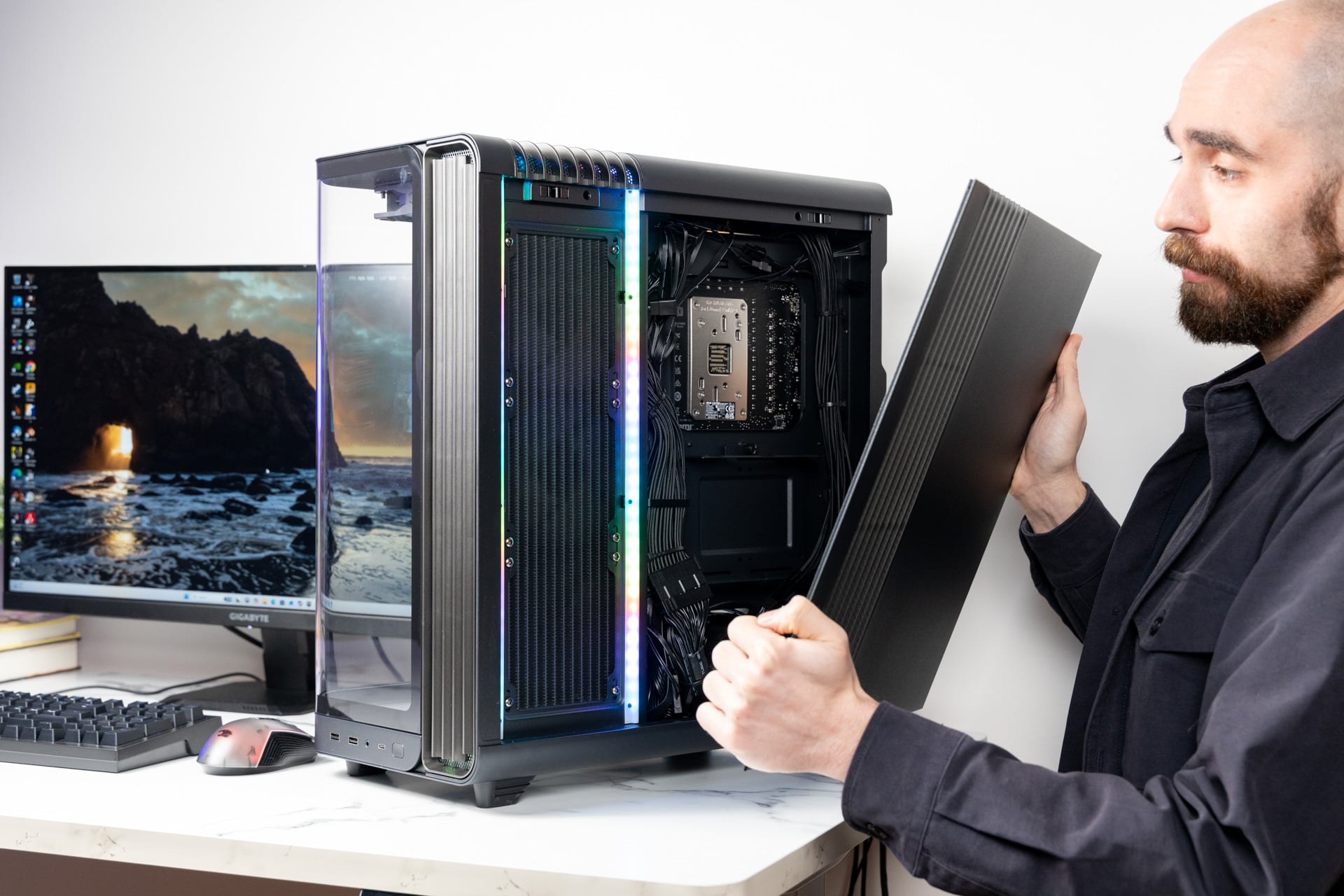
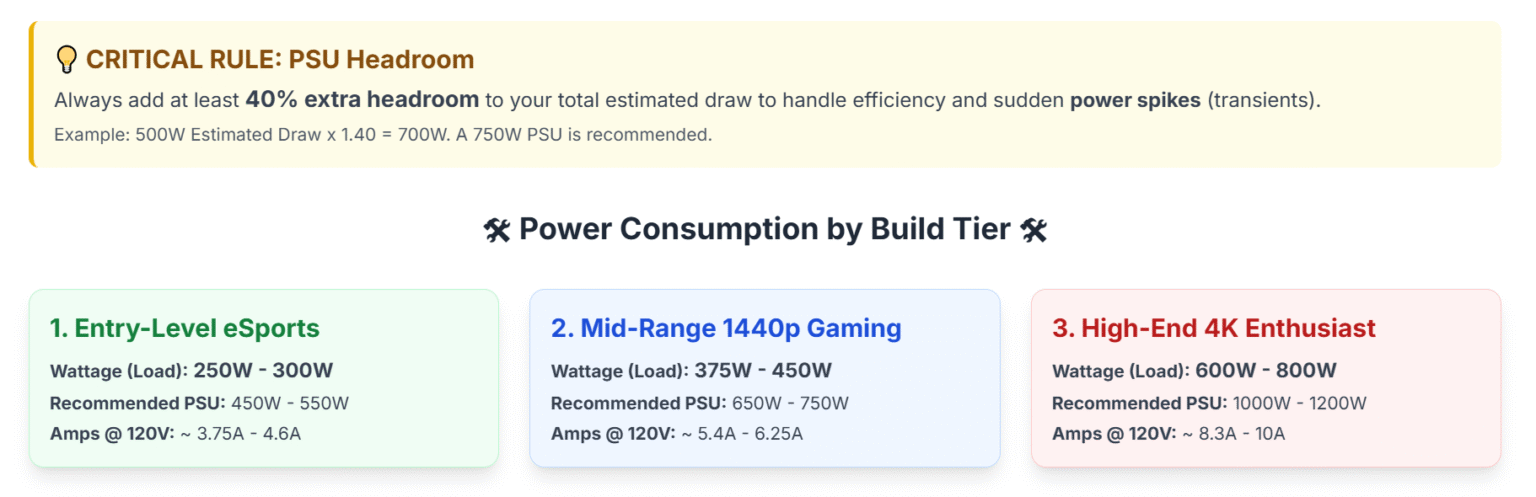
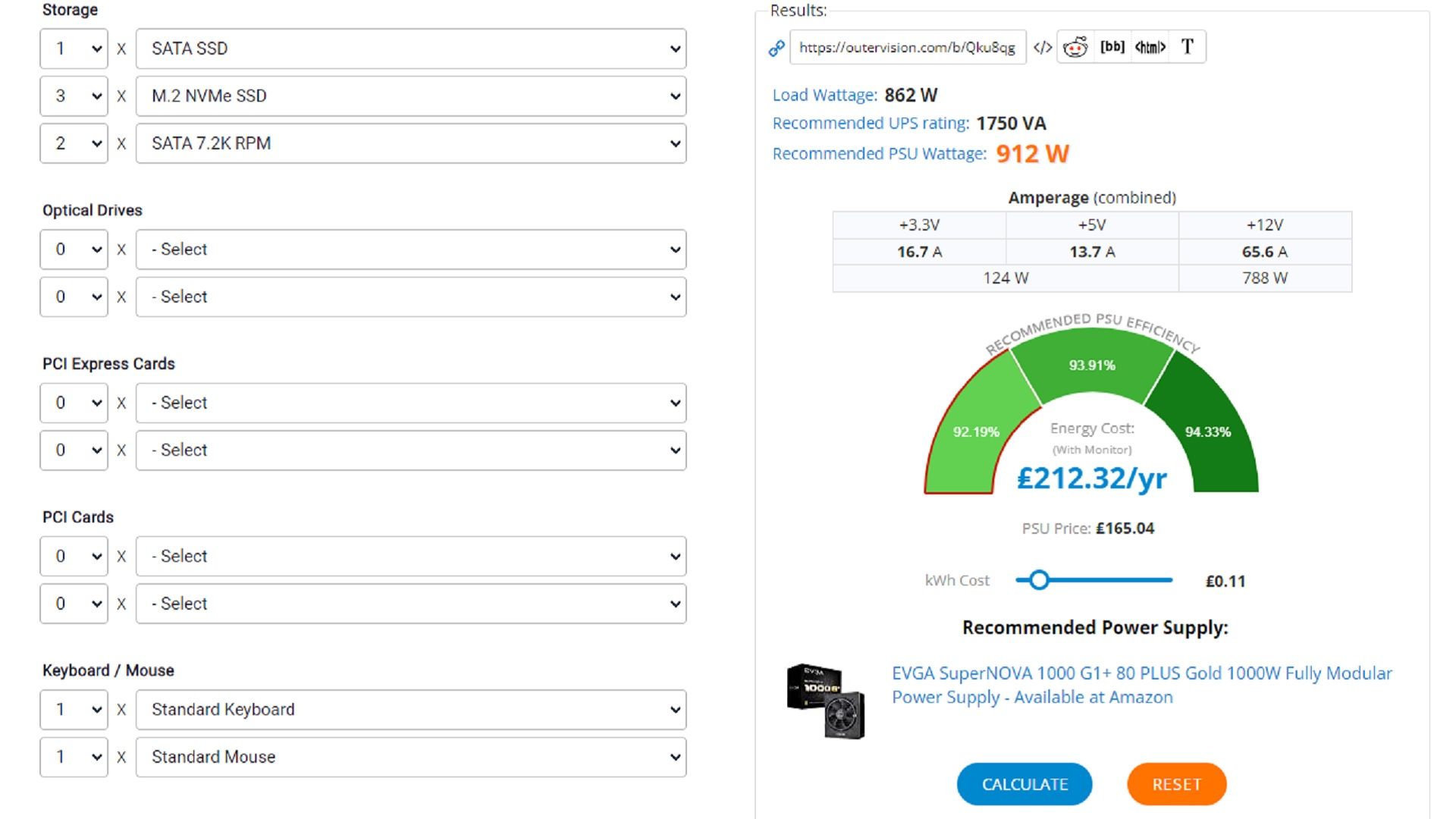


IBuyPower Trace X Review The Fishbowl Gaming PC You Want To Swim In IBuyPower Trace X PC Desktop Review 06 . How Many Amps Watts Does A Gaming PC Use How Much Electricity Does A Image 1 1536x497 . What Power Supply Unit Do You Need For Your Gaming PC 163082 Gadgets News Feature What Power Supply Unit Do You Need For Your Gaming Pc Image9 Kysdmwzdap . The Big Surprise In Home Energy Consumption Gaming PCs Gamer Computer Use 580 264 . How Much Storage Do I Need For My Pre Built Pc Gaming PC Buying Guide 3